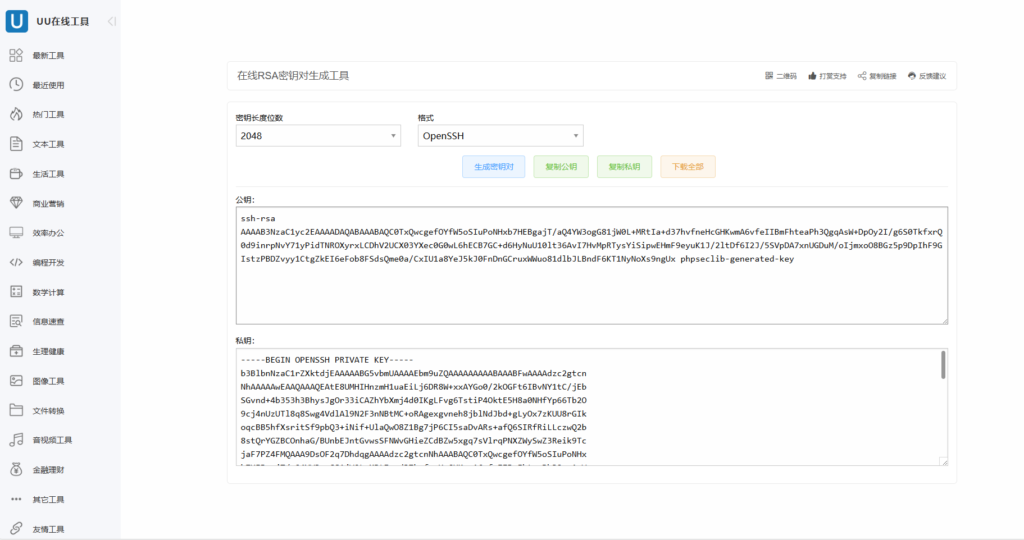
去到在线RSA密钥对生成工具 – UU在线工具
密钥长度位数选择2048或者更高
格式选择OpenSSH
私钥保存好
名称随意例如miyao后面没有任何后缀
连接VPS使用刚才生成的公钥
粘贴你的公钥内容
echo "粘贴你的公钥内容" >> ~/.ssh/authorized_keys
chmod 600 ~/.ssh/authorized_keys
进入/etc/ssh/sshd_config目录
编辑sshd_config文件内容
删除PubkeyAuthentication yes前面的#
在PubkeyAuthentication yes添加下面内容
# 禁用 root 用户密码登录,仅允许通过密钥登录
PermitRootLogin prohibit-password

PubkeyAuthentication yes
找到PermitEmptyPasswords no前面的#删除掉
在PermitEmptyPasswords no下面内容
PasswordAuthentication no

PermitEmptyPasswords no
例如
然后重启vps就可以使用密钥登陆了
重启命令
reboot这样就可以通过密钥登陆SSH增强VPS的安全性